

In today’s business environment, WiFi is no longer a convenience — it’s infrastructure. From cloud-based software and VoIP systems to security cameras, point-of-sale terminals, and video conferencing platforms, nearly every critical operation depends on stable, secure wireless connectivity.
When commercial WiFi underperforms, the consequences aren’t minor inconveniences. They are lost sales, frustrated employees, dropped client meetings, security risks, and operational slowdowns.
This guide is written for:
- Business owners
- Office managers
- Operations directors
- Property managers
- IT decision-makers
- Facility managers overseeing multi-floor buildings
If your organization relies heavily on internet connectivity, understanding common commercial WiFi problems — and how to solve them properly — is essential.
Why Commercial WiFi Is Different from Residential WiFi
Before diving into specific problems, it’s important to clarify one thing: commercial WiFi is fundamentally different from home WiFi.
A residential setup typically supports:
- 10–30 devices
- Streaming, gaming, browsing
- One or two routers
- Basic security settings
A commercial environment may support:
- 50 to 500+ connected devices
- Cloud-based business applications
- VoIP phone systems
- Guest networks
- Security cameras
- Smart building systems
- Multiple departments requiring network segmentation
Trying to run a commercial environment on residential-grade equipment is one of the most common root causes of ongoing WiFi problems.
Common Commercial WiFi Problems (And What Causes Them)
Let’s break down the most frequent issues businesses face — and why they happen.
Problem #1: Slow Speeds During Peak Business Hours
What It Looks Like:
- Video calls freeze or drop
- Cloud software loads slowly
- POS systems lag during busy periods
- Employees complain about buffering
Why It Happens:
Commercial WiFi networks often fail because:
- Too many devices share limited bandwidth
- Improper access point placement
- Outdated hardware
- No traffic prioritization
- Insufficient internet plan from ISP
In retail stores, restaurants, or office environments, traffic spikes at predictable times. Without bandwidth management and capacity planning, the network becomes congested.
The Professional Solution:
- Conduct bandwidth analysis
- Upgrade to enterprise-grade routers and switches
- Install multiple wired access points
- Implement Quality of Service (QoS) settings
- Separate guest traffic from operational traffic
QoS ensures critical systems like POS terminals or video conferencing receive priority over guest browsing or streaming.
Problem #2: Dead Zones in Large or Multi-Floor Buildings
What It Looks Like:
- Certain rooms have weak or no signal
- WiFi works downstairs but fails upstairs
- Warehouse corners lose connectivity
- Conference rooms consistently experience drops
Why It Happens:
Dead zones occur due to:
- Thick walls (concrete, brick, metal)
- Improper router placement
- Relying on a single access point
- Poor signal planning
In commercial properties, construction materials significantly weaken signals. Elevators, machinery, and electrical systems can also cause interference.
The Professional Solution in Eliminating Dead Zones:
- Conduct a wireless site survey
- Map signal strength throughout the building
- Install ceiling-mounted access points strategically
- Use wired backhaul instead of wireless extenders
- Add outdoor-rated access points where necessary
Unlike plug-in extenders, professionally installed access points maintain full bandwidth and provide seamless roaming between zones.
Problem #3: Network Drops During Video Conferences

What It Looks Like:
- Frozen screens during client meetings
- Audio delays
- Frequent reconnections
- Poor VoIP call quality
Why It Happens:
Commercial networks often lack:
- Traffic prioritization
- Proper channel management
- Interference control
- Load balancing
Video conferencing requires stable upload and download speeds. When multiple users connect simultaneously without traffic management, performance degrades rapidly.
The Professional Solution:
- Configure QoS to prioritize VoIP and conferencing
- Optimize channel selection
- Install WiFi 6 or newer access points
- Balance client loads across multiple access points
Modern WiFi standards improve performance in high-density environments by handling multiple simultaneous connections more efficiently.
Problem #4: Guest WiFi Slowing Down Business Operations
Many businesses offer guest WiFi — hotels, medical offices, retail stores, and restaurants especially.
What It Looks Like:
- Customers streaming videos
- Guests consuming large bandwidth
- Internal systems are slowing down
Why It Happens:
When guest and internal traffic share the same network without segmentation, guests can unintentionally impact business-critical systems.
The Professional Solution:
- Create separate VLANs for guest networks
- Set bandwidth limits for guest users
- Isolate internal systems
- Implement captive portals with authentication
This ensures operational systems remain protected and high-performing regardless of guest activity.
Problem #5: Security Vulnerabilities
Security is one of the most overlooked aspects of commercial WiFi.
What It Looks Like:
- Unauthorized devices connecting
- Data breaches
- Suspicious network activity
- Compliance failures
Why It Happens:
Common causes include:
- Weak passwords
- Outdated firmware
- Shared networks
- No encryption upgrades
- No firewall configuration
Businesses handling sensitive data — healthcare providers, law firms, financial institutions — face serious risks when WiFi security is poorly managed.
The Professional Solution:
- Implement WPA3 encryption
- Separate networks by department
- Enable firewall and intrusion detection
- Regular firmware updates
- Access control policies
Enterprise security architecture is critical in protecting both company data and client information.
Problem #6: WiFi Extenders That Make Things Worse
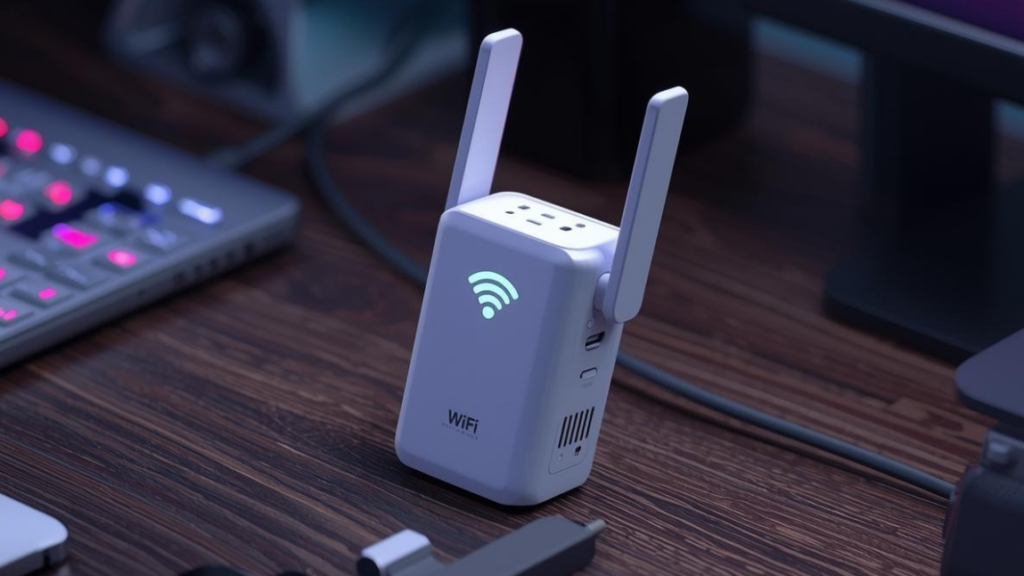
Many businesses attempt to fix coverage issues using consumer-grade WiFi extenders.
What It Looks Like:
- Speeds drop in extended areas
- Inconsistent connectivity
- Devices switching between networks
Why It Happens:
Extenders rebroadcast existing signals, cutting bandwidth in half and increasing latency. They do not create true distributed networks.
The Professional Solution:
- Install wired access points connected to a central switch
- Use managed wireless controllers
- Configure seamless roaming
This provides consistent performance across the entire facility without sacrificing speed.
Problem #7: Network Cannot Scale as Business Grows
What It Looks Like:
- Performance declines after hiring new staff
- Adding devices crashes the network
- Expansion requires full equipment replacement
Why It Happens:
The original network was not designed for growth. Many systems lack scalability planning.
The Professional Solution:
- Install scalable switching infrastructure
- Use modular access point systems
- Plan bandwidth for future growth
- Choose hardware that supports upgrades
Scalable architecture prevents costly full replacements down the line.
Problem #8: Poor WiFi in High-Density Environments
Environments like:
- Event venues
- Conference centers
- Schools
- Large open offices
Often struggle with device density.
What It Looks Like:
- Network overload during events
- Hundreds of devices competing
- Slowdowns even with high ISP speeds
Why It Happens:
High-density areas require:
- Advanced traffic management
- Modern wireless standards
- Channel planning
Consumer routers are not designed for high-density client loads.
The Professional Solution:
- Deploy WiFi 6 or WiFi 7 technology
- Install multiple access points
- Optimize channel overlap
- Enable band steering
High-density wireless design requires careful planning and professional configuration.
When to Consider a Commercial WiFi Upgrade
If your organization experiences any of the following regularly, it may be time for a professional evaluation:
- Frequent complaints from employees
- Inconsistent coverage
- Dropped video meetings
- POS delays
- Security concerns
- Ongoing reliance on extenders
- Business expansion plans
A structured network assessment often reveals inefficiencies that basic troubleshooting cannot fix.
The Professional Approach to Solving Commercial WiFi Issues
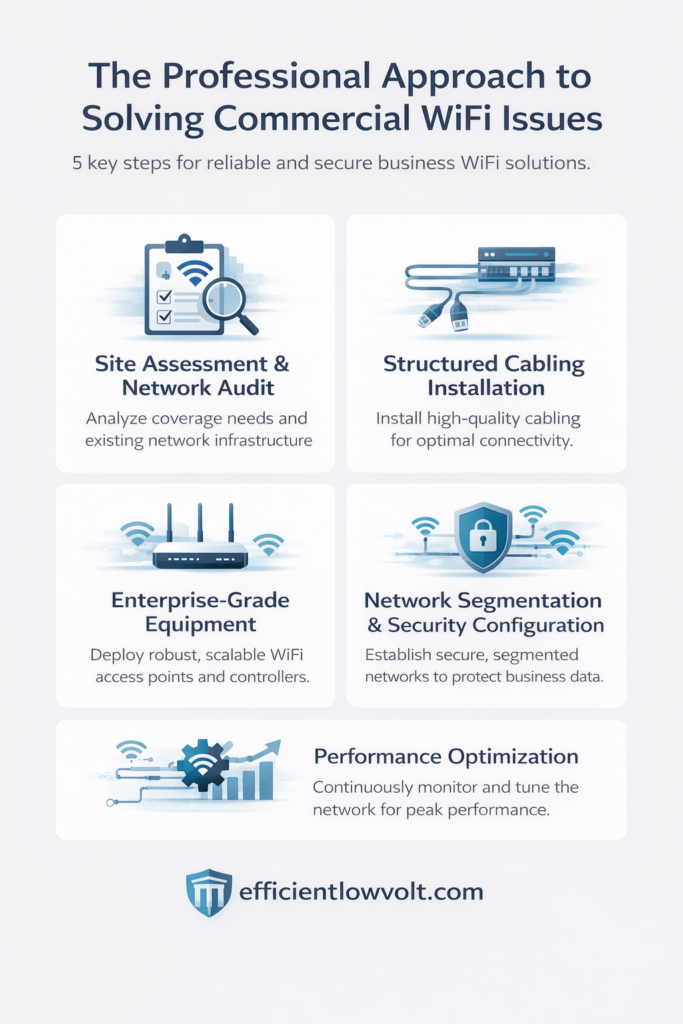
Fixing commercial WiFi isn’t about replacing a router. It’s about engineering a network.
Here’s what a professional solution typically involves:
1. Site Assessment & Network Audit
This includes:
- Physical layout evaluation
- Device count estimation
- Current ISP speed analysis
- Interference testing
- Coverage heat mapping
- Infrastructure inspection
A network is designed based on data — not guesswork.
2. Structured Cabling Installation
Wired backbone infrastructure is essential.
Professional installations use:
- Cat6 or Cat6A cabling
- Centralized network racks
- Managed switches
- Clean cable routing
- Redundancy planning
Wireless networks depend on strong wired foundations.
3. Enterprise-Grade Equipment
Commercial environments require:
- Business-class routers
- Managed switches
- Controller-based access points
- Cloud-managed systems
- Scalable hardware
Consumer routers are not built for business continuity.
4. Network Segmentation & Security Configuration
Segmentation protects operations by separating:
- Employee network
- Guest network
- Security systems
- IoT devices
- POS systems
This prevents vulnerabilities from spreading across the entire organization.
5. Performance Optimization
Optimization includes:
- Channel selection to reduce interference
- Load balancing
- Power tuning
- Bandwidth prioritization
- Firmware updates
- Continuous monitoring
Optimization is ongoing — not a one-time setup.
The Business Impact of Solving WiFi Problems
Investing in properly designed commercial WiFi leads to:
- Increased employee productivity
- Smoother customer experiences
- Reduced downtime
- Stronger cybersecurity
- Scalability for growth
- Better client interactions
- Higher operational efficiency
In many cases, improved network performance directly impacts revenue — especially in retail, hospitality, and service-based industries.
Strengthening Your Network Infrastructure
Commercial WiFi problems rarely resolve themselves. Quick fixes may temporarily reduce frustration, but they do not address structural weaknesses in network design.
Businesses that treat WiFi as core infrastructure — rather than an afterthought — experience fewer disruptions, greater security, and smoother daily operations.
If your organization depends on connectivity to serve customers, manage operations, and support employees, your wireless network should be engineered with the same level of attention as any other critical system in your building.
For businesses ready to eliminate persistent connectivity issues and invest in a future-ready network, Efficient Lowvolt Solutions provides professionally designed WiFi systems tailored to commercial environments. Their team specializes in high-speed, secure, and scalable wireless networks that eliminate dead zones, optimize bandwidth usage, and support multiple devices without interruption. Whether upgrading an office, retail space, or multi-floor facility, Efficient Lowvolt Solutions engineers customize infrastructure that keeps your operations connected — anytime, anywhere. Contact Us Today!